V2SPEED VPN
- 4.3
- Rating
- 500.00K
- Installs
- Free
- Price

 Analysis by App-foxy
I approached V2SPEED VPN as a practical tools app rather than as a promise of perfect privacy or unlimited performance. Its main appeal is straightforward: it gives Android users a simple way to start using a VPN without paying for the download. The interface is designed around a user-friendly experience, and that matters because a VPN can quickly become confusing when it buries connection controls under technical language.
In everyday use, I found the app easiest to understand when I treated it as a quick connection utility. I wanted to open it, identify the main action, and decide whether I needed the VPN at that moment. That makes it potentially useful for people who are new to VPNs, users who do not want to configure a connection manually, and anyone who prefers a small tools app over a complicated security suite.
V2SPEED VPN is developed by V2speed Vpn App Creator Ltd and is available free of charge. It is listed for Everyone, supports Android 5.0 and later, and its current release is version 1.1.5. Those details make it approachable for people using older Android phones, although compatibility alone does not guarantee that every device will feel equally smooth or easy to operate.
You May Also Like

 Google Keep - Notes and lists
Google Keep’s Quiet Growth Shows the Appeal of Simpler Notes
As mobile work gets busier, Google Keep keeps winning a simple contest: capture a thought quickly, find it later, and get on with the day.

 Blood Strike: 2.5 Anniversary
Blood Strike’s Loadouts Turn Every Drop Into a Tactical Gamble
A close look at Blood Strike’s custom loadouts: how fast access to signature weapons reshapes its battle royale rhythm, rewards preparation, and narrows the gap between fights.

 Pandora - Music & Podcasts
Pandora’s Music Is Easy to Start, but Harder to Recover
Pandora’s strength is its low-effort path from a seed to a station. Its weak spot is how much confidence it asks you to place in connection, setup, and quiet recovery.

 8 Ball Pool
 Is Built on Rivalries, Rematches, and Routine
A close look at the rivalries, rematches, shared routines, and unanswered safety questions that turn a quick pool match into a persistent mobile community.

 Samsung Music
’s Quiet Strength Is Playing What You Already Own
Its reach comes less from spectacle than from dependable access to a personal library. That simplicity is both the app’s strongest retention engine and its ceiling.

 AccuWeather: Weather Radar
AccuWeather Review: A Quick, Clear Forecast for Everyday Decisions
For everyday plans, the best forecast is the one you can understand quickly. AccuWeather makes rain timing, radar, and local conditions easy to act on, with a few trade-offs.
More From Our News Desk



How the interface feels for different users
I look at how V2SPEED VPN’s focused interface may feel to people with different levels of experience, confidence, and access needs. A useful way to judge it is to try the same connection routine in a calm moment and notice whether each step feels clear and manageable.
Readability and navigation without unnecessary clutter
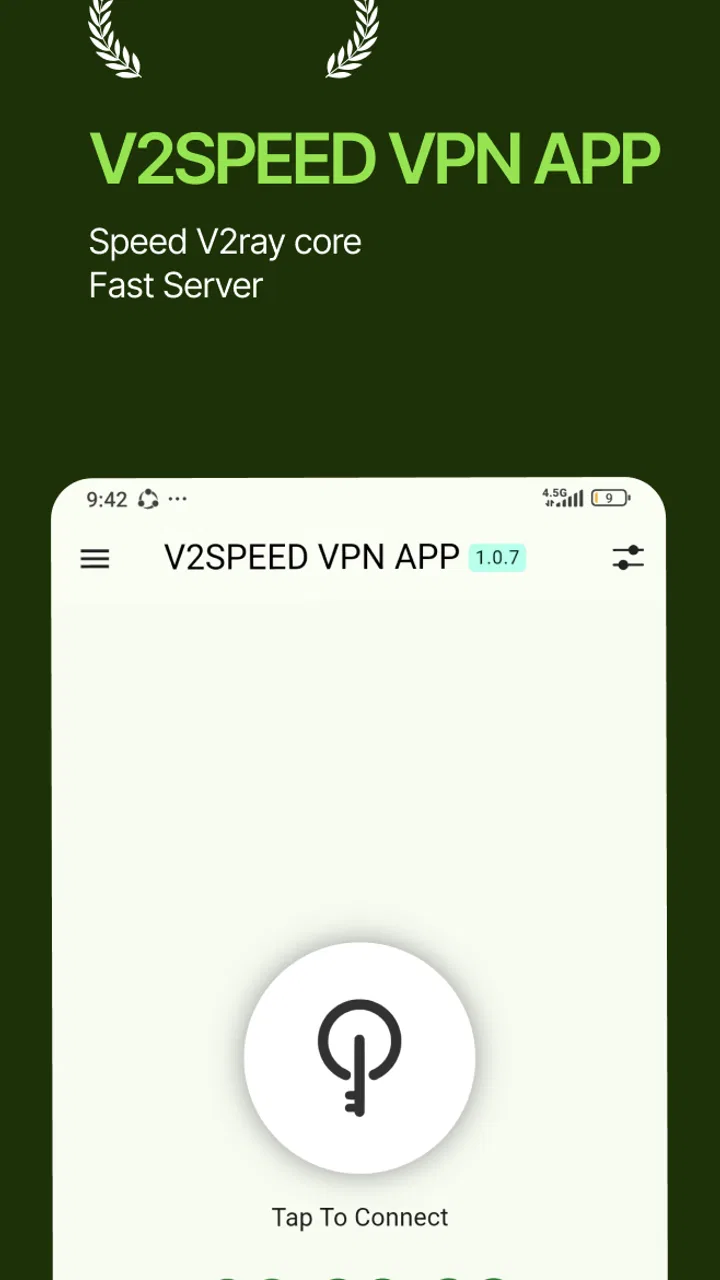
The strongest part of the experience is the app’s uncomplicated direction. A VPN should not require a networking lesson before the first connection, and V2SPEED VPN aims for the opposite approach. The central task is easy to recognize, which helps me avoid the hesitation I often feel in apps that present several equally prominent buttons, server choices, and technical indicators at once.
That simplicity can be especially helpful for people who have limited experience with VPN terminology. Words such as protocol, tunneling, encryption, and routing are useful for advanced users, but they can make a first session feel inaccessible. V2SPEED VPN is better suited to someone who wants an understandable starting point rather than a dashboard full of controls.
I also see a benefit for users who experience visual fatigue. A focused layout gives the eyes fewer places to search, and a short decision path reduces the need to repeatedly scan a crowded screen. This is not the same as claiming formal accessibility support, but it is a meaningful practical quality: the app does not make its basic purpose feel harder than it needs to be.
Still, readability depends on more than a clean arrangement. Text size, contrast, spacing, and the clarity of connection states all affect whether an app works well for someone with low vision or changing eyesight. I would not choose this VPN solely because the interface feels simple. I would first open it on the intended phone and check whether the labels and status information are comfortable to read without relying on guesswork.
One useful habit is to test the first connection while sitting somewhere quiet, rather than waiting until you are in a rushed situation. That lets you learn what the connected and disconnected states look like. Once I know which visual cue confirms an active connection, I am less likely to assume that tapping a button completed the process when it did not.
Motor effort and sensory comfort
For users with limited dexterity, a VPN app is easier to handle when the main control is obvious and does not require a chain of tiny selections. V2SPEED VPN’s straightforward purpose works in its favor here. The fewer decisions I have to make before connecting, the less demanding the interaction becomes for someone using one hand, a smaller phone, or an assistive touch method.
That said, a simple workflow is not automatically a low-effort workflow for everyone. Touch targets, button placement, and the need to respond to Android’s system confirmation can still affect the experience. A person with tremors or reduced precision may prefer to enable the connection when they have time to tap carefully, not while walking through a station or trying to complete a payment.
There is also a sensory angle. VPN apps can create uncertainty if they change state without making the result obvious. I prefer a clear visual confirmation and a status that remains understandable after the initial tap. If the app’s visual feedback is too subtle, a user with reduced vision may need to reopen the app or inspect the phone’s system indicators more often than expected.
People who depend on screen readers should evaluate the actual labels and reading order on their device before relying on the app. I cannot treat a user-friendly design as proof that every control is fully exposed to assistive technology. The sensible approach is to perform a short trial: open the app, move through the controls with the screen reader enabled, start a connection, and confirm that the resulting state is announced clearly.
For users sensitive to animation, sound, or sudden visual changes, the best experience will depend on how the individual phone presents the app. I would keep system accessibility settings enabled and avoid making a connection in a high-pressure moment until I knew how the app behaves. This small preparation is more valuable than assuming that a minimal interface will suit every sensory preference.
Situational access in ordinary routines
The most convincing use case is a short, deliberate session on an unfamiliar network. Imagine working from a library or visiting a hotel where the Wi-Fi is convenient but not part of your normal routine. I would open V2SPEED VPN before checking email, accessing a work dashboard, or handling a personal account. The value is not that it removes every online risk; it is that it gives me a quick privacy layer without requiring a separate manual setup.
Another realistic situation is temporary travel. Someone using an older Android phone may not want to replace the device just to install a basic VPN tool, and support for Android 5.0 and later makes the app relevant to a wider range of hardware. I would still test it before leaving home, because a tool that installs successfully can behave differently once mobile networks, battery-saving settings, or unfamiliar Wi-Fi are involved.
The free price also changes who can reasonably try it. A student, occasional traveler, or family member who only needs a VPN now and then can experiment without committing money first. That lowers the barrier to entry, but it should not encourage careless use. Free access is a reason to test the app, not a reason to assume that all privacy needs are automatically covered.
For people who struggle with complicated account flows, a direct utility can be less intimidating than a large subscription-based security product. If I am helping a relative use a VPN, I would rather teach one repeatable routine than explain a collection of settings they will never touch. The teaching point would be simple: open the app, connect before the sensitive task, check the active state, and disconnect when the session is finished if that matches their routine.
There is a trade-off for users who need constant, unattended protection. A quick interface is useful when I remember to use it, but it places responsibility on me to start the connection at the right time. Someone who wants automatic protection across every network, detailed notifications, or tightly managed device policies may be better served by a more advanced VPN product, provided that product’s controls are also understandable to them.
Where it fits beside familiar VPN alternatives
Compared with configuring Android’s built-in VPN settings manually, V2SPEED VPN is the more approachable route for a person who does not know the required connection details. Manual setup can offer more control, but it also asks the user to understand technical fields and maintain them. I would choose the app for convenience and the system settings for a situation where an administrator or experienced user has supplied exact configuration instructions.
Compared with full security suites, V2SPEED VPN feels more focused. A security suite may combine a VPN with malware scanning, password tools, identity monitoring, or parental controls. That broader package can be worthwhile for a household that wants one place to manage several protections. It can also increase visual and cognitive load. I would not recommend switching to a large suite merely because it has more buttons; I would choose it only if those additional tools solve problems the VPN alone does not address.
Compared with paid VPN services, the main question is not simply whether the app is free. I would also consider the connection experience, available choices, consistency on the networks I use, and the amount of control I need. A paid alternative may make more sense for someone who depends on a VPN for work every day or wants a carefully documented service with advanced settings. V2SPEED VPN is easier to justify for occasional, straightforward use where the first priority is getting started without a purchase.
Users who need a VPN for specialized tasks should be cautious about choosing based only on a friendly interface. Streaming access, gaming latency, business compatibility, and location-specific requirements can demand capabilities that are not part of a simple connection workflow. I would test the exact activity during the trial period rather than assume that a general VPN app will behave well for every service.
Practical limitations that affect inclusive use
The first limitation is that simplicity can hide important decisions. A beginner may appreciate not seeing technical details, while an experienced user may feel unable to fine-tune the connection. That is a real accessibility trade-off: reducing complexity helps some people act independently, but reduced control can frustrate users who need a specific setup for work, travel, or a particular network.
The second limitation is the responsibility placed on the user to interpret connection status. When a VPN is used for an important task, I do not want to rely on memory or a vague impression that the app is active. I recommend checking the state before opening sensitive services and checking again after switching networks. This is particularly important for users who are distracted, have memory difficulties, or are operating the phone under time pressure.
The third limitation concerns expectations. A VPN can change how a connection is routed, but it is not a substitute for strong passwords, software updates, careful handling of suspicious messages, or device-level accessibility settings. Someone may install V2SPEED VPN expecting it to solve every online safety issue. I would explain its role narrowly: it is a connection tool, not a complete digital safety plan.
Older Android support is helpful, but older hardware can introduce its own friction. A phone with limited storage, aggressive battery management, or a slow processor may make any background network tool feel less responsive. If the app is being installed for a family member with an older device, I would test it alongside the apps they use most. A VPN that works in isolation may still be inconvenient if it interferes with the person’s normal routine.
People with limited data plans should also pay attention to how VPN use fits their habits. Routing traffic through a VPN does not remove the underlying data consumption of video, cloud backups, or large downloads. I would avoid treating the VPN as a reason to use more mobile data, especially while traveling. The app can be useful on a public network, but it does not make an expensive connection unlimited.
Finally, anyone who needs formal organizational support should look beyond ease of use. A workplace, school, or care provider may require a particular VPN configuration, documented controls, or compatibility with managed devices. In that context, an independently chosen consumer tool may not be the right answer. The more important the network access, the more carefully I would match the app to the organization’s requirements.
Who will appreciate it most
I think V2SPEED VPN is most appealing to Android users who want a free, uncomplicated entry point into VPN use. It suits occasional travelers, people connecting from public places, and beginners who do not want to study networking concepts before trying a privacy tool. Its Everyone content rating also makes it approachable for a broad audience, although parents and caregivers should still teach younger users when a VPN is appropriate and what it does not protect against.
It can also help someone who is supporting another person with technology. A clearly focused app is easier to demonstrate over a phone call or in person than a service with several layers of settings. I would create a short routine around it rather than presenting it as a magic button. That approach supports users with different levels of confidence and reduces the chance that they will tap randomly when the connection state is unclear.
The app has attracted an average rating of 4.3 from around 18 thousand ratings, with over 500 thousand installs, so it has already reached a substantial group of Android users. I see that as a useful sign of interest, not as a guarantee that it will suit every phone or every person. Ratings can tell me that many people are willing to try the app; they cannot replace testing the interface with my own accessibility settings and network habits.
Who should choose another approach
I would steer advanced users toward a more configurable option if they need protocol choices, detailed diagnostics, specialized routing, or a service designed around a particular professional workflow. I would also look elsewhere if my main goal were a complete security package rather than a focused VPN utility.
I would hesitate to recommend it as the only solution for someone who cannot reliably identify whether the connection is active. In that case, the issue is not a lack of technical knowledge; it is the need for unmistakable feedback and a routine that the person can perform comfortably. If the app’s state is difficult to perceive with the user’s vision, hearing, motor, or cognitive setup, another product with stronger assistive support may be a better choice.
I would also avoid making it the default recommendation for a business-managed phone without checking the organization’s rules. A free consumer tool can be perfectly reasonable for personal browsing, yet inappropriate when a company requires approved infrastructure or specific security controls. The right decision depends on the consequences of a failed or misunderstood connection.
An inclusive verdict after everyday testing
My overall view is positive but deliberately practical. V2SPEED VPN succeeds most clearly as an accessible starting point: it is free, its purpose is easy to grasp, and its focused design can reduce the mental effort involved in beginning a VPN session. For many Android users, especially those on older devices or those who dislike technical setup, that is a meaningful advantage.
Its inclusive value comes from reducing unnecessary decisions, not from proving that every accessibility need has been solved. Users with visual, motor, sensory, or cognitive differences should test the actual controls with their own device settings. I would pay particular attention to text clarity, touch accuracy, screen-reader announcements, and how confidently I can recognize the connected state.
My recommendation is to install it as a trial tool, test it at home, and then use it deliberately on the kinds of networks where it matters. Keep expectations realistic, and move to a more advanced or better-documented alternative when work requirements, specialized activities, or stronger assistive needs demand it. For straightforward personal use, V2SPEED VPN is worth trying because it makes the first step less intimidating without pretending to replace every other layer of online safety.
FAQs for V2SPEED VPN
01What platforms is V2SPEED VPN available on?
V2SPEED VPN is available for both Android and iOS devices. Users can download the app from the Google Play Store or the Apple App Store, ensuring compatibility with a wide range of smartphones and tablets. This cross-platform availability makes it a versatile choice for users seeking secure internet connections across different devices.
02Does V2SPEED VPN offer a free version, and what are its limitations?
Yes, V2SPEED VPN offers a free version with limited features. While it allows users to connect to a limited number of servers, the free version may have restrictions on data usage and connection speed. For full access to all servers and enhanced features, users can upgrade to a premium subscription.
03How does V2SPEED VPN ensure user privacy and security?
V2SPEED VPN employs advanced encryption protocols to safeguard user data and ensure privacy online. It masks your IP address, making it difficult for third parties to track your online activities. Additionally, the app adheres to a strict no-logs policy, ensuring that your browsing history remains confidential and secure.
04What are the premium features offered by V2SPEED VPN?
Premium features of V2SPEED VPN include access to a wider range of global servers, faster connection speeds, and unlimited data usage. Premium users can also benefit from priority customer support and advanced security features, such as a kill switch and split tunneling, providing a comprehensive VPN experience.
05Is V2SPEED VPN user-friendly for beginners?
V2SPEED VPN is designed with a user-friendly interface, making it accessible for beginners. The app features easy-to-navigate menus and one-tap connectivity, allowing users to quickly secure their internet connection. Additionally, the app provides helpful tutorials and customer support to assist new users in getting started.
Pros
- Fast connection speeds for streaming and gaming.
- Easy-to-use interface for quick setup.
- Robust security features protect privacy.
- Wide range of server locations worldwide.
- No logs policy ensures user anonymity.
Cons
- Limited free version with few servers.
- Occasional connection drops in peak times.
- Customer support lacks 24/7 availability.
- App interface lacks advanced settings.
- Free version contains ads that can be intrusive.

V2SPEED VPN
Gallery